---
title: "Present Codes"
site: "Game8 Store – Developer Center"
lang: "en"
category: "Features"
canonical: "https://developers.store.game8.jp/en/campaigns/"
---
# Present Codes
📝 This is a reference translation. In case of any discrepancy, the Japanese version prevails.
This page explains how to issue present codes and how to use the campaign list.
### 1. What you can do with this feature
- Campaign list
- Issuing a new present code
- Exporting the campaign list as CSV
### 2. Screen Fields
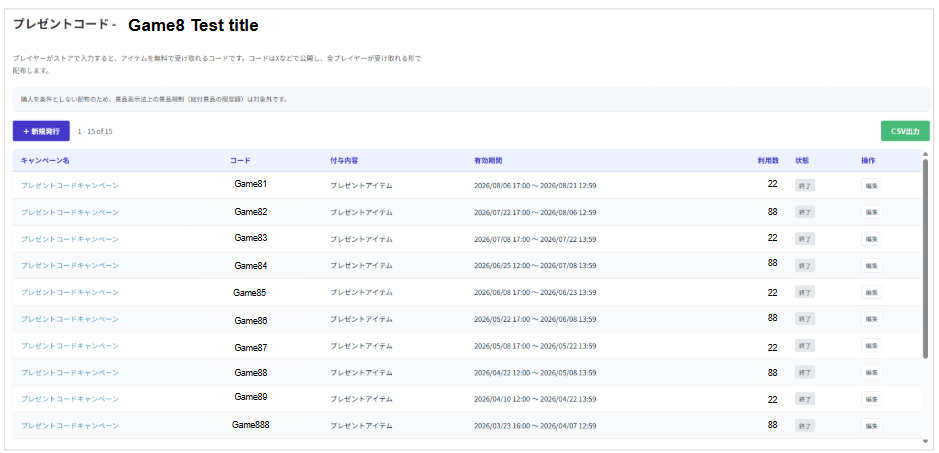
- **Campaign list**

On the Present Codes screen, you can review ongoing and finished campaigns in a list. The fields are as follows.
| Field | Description |
| --- | --- |
| Campaign Name | Shows the campaign name you set. |
| Code | Shows the present code string that players enter. |
| Reward | Shows the display name of the present item. |
| Validity Period | Shows the campaign's validity period (start date and time to end date and time). |
| Redemptions | Shows the cumulative number of times the code has been redeemed. |
| Status | Shows the current status (such as Ongoing or Ended). |
| Actions | The [Edit] button lets you review the campaign details and change its settings. |
- **New Code**
**1. Basic Information**
| Field | Description |
| --- | --- |
| **Campaign Name** | Sets the campaign name used for internal management (up to 40 characters).
*This can still be changed after issuing. |
| **Code string** | Sets the code that players enter (letters and digits, 4 to 20 characters).
・「**Generate**」 creates a random code.
・To prevent misreading, characters that are hard to tell apart (O, 0, I, 1) are excluded from auto-generation.
※**This cannot be changed after issuing**。 |
**2. Present item***This creates the item distributed by the code at the same time.
| Field | Description |
| --- | --- |
| Display Name | Sets the name of the reward item. |
| Item ID | Sets the item identifier used to link with the game's system. |
| Sales Price | Because this is a present item, the price is fixed at **0 yen**. |
| Description | Enter supplementary notes about the reward item. |
| Benefit Description | Enter the specific contents of the reward and any cautions. |
| Thumbnail | Upload the icon image for the reward. |
| Bundle Items | Add and configure the items to be granted.
*Granting is performed by calling the publisher API `/register`. If it fails because of an inventory cap or similar on the game side, the code is not consumed and the player can retry after meeting the conditions.
※**This cannot be changed after issuing**。 |
**3. Publish & Schedule***This applies to both the campaign and the present item.
| Field | Description |
| --- | --- |
| Start Date & Time | Specifies the date and time when publishing starts.
*If left blank, the campaign **starts immediately** (leaving it blank while editing a published campaign also switches it to an immediate start). |
| End Date & Time | Specifies the date and time when the campaign ends.
Codes become unusable once that date and time has passed.
*This can still be changed after issuing. |
| Status | Choose from Unpublished, Admin Only, and Public.
*This can be changed or stopped after issuing. |
**4. Campaign Page***These are the settings for the special page shown in the "Enter Code" tab of the game page.
| Field | Description |
| --- | --- |
| Key Visual Image | Sets the main image of the special page.
・Recommended size: 1200 x 630 px (png / jpg, up to 5MB) |
| Introduction | Enter text that conveys the outline and appeal of the campaign. |
| Gift contents | Enter the list of rewards players receive (use Add item to register more than one). |
| Notes | Enter the terms and conditions (you can check Emphasize in red). |
| How to redeem | Sets the steps from obtaining the code to receiving the reward (Step 1 to 3 and so on) with text and images.
*The note "A Game8 account and sign-in are required" is inserted automatically. |
| Preview | Lets you check in real time how the content you entered will appear on the special page. |