Home › Features
Coupon Codes
📝 This is a reference translation. In case of any discrepancy, the Japanese version prevails.
This page explains how to review the coupon code campaign list and how to issue a new coupon.
What you can do with this feature
- Campaign list
- Issuing a new coupon code
- Exporting the campaign list as CSV
Screen Field Descriptions
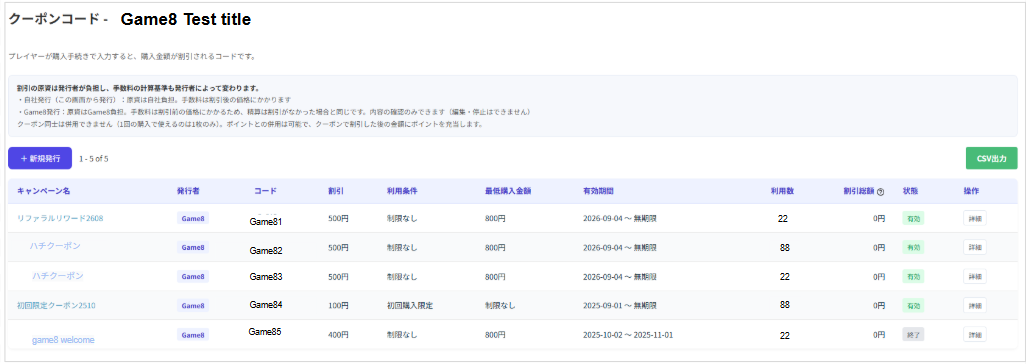
- Campaign list
On the Coupon Codes screen in the admin console, you can review ongoing and finished campaigns in a list. The fields are as follows.

| Field | Description |
|---|---|
| Campaign Name | Shows the campaign name you set. |
| Issuer | Shows who issued the coupon (Game8 and so on). |
| Code | Shows the coupon code that users enter at checkout. |
| Discount | Shows the discount amount or discount rate that applies (〇〇 yen / 〇〇%). |
| Requirements | Shows the usage condition (No restriction, First purchase only, and so on). |
| Min. Purchase | Shows the purchase amount required to use the coupon (No restriction if there is none). |
| Valid Period | Shows the start and end date and time during which the coupon can be used (〜No end date if it does not expire). |
| Uses | Shows the total number of times the coupon has actually been used by users. |
| Total Discount | Shows the cumulative discount amount applied by this coupon so far. |
| Status | Shows the current status of the coupon. ・Active: currently usable ・Ended: unusable because it has expired or been suspended |
| Actions | Pressing the [Details] button lets you review the coupon's details and change its settings. |
- Basic coupon specifications
Who bears the cost and which operations are permitted depend on who issues the coupon. The rules on combining coupons at the time of use are the same for all coupons.
[Differences by issuer]
| Field | Issued by you (created in the admin console) | Issued by Game8 |
|---|---|---|
| Who funds the discount | You | Game8 |
| Fee calculation basis | Applied to the discounted price | Applied to the price before the discount (settled the same as if there were no discount) |
| Available operations | Issue, edit, suspend | View only (cannot be edited or suspended) |
[Rules on combining]
・Coupons with coupons: cannot be combined (only one per purchase)
・Points: can be combined (points are applied to the amount after the coupon discount)
- Issuing a new coupon code
- Basic Information
| Field | Description |
|---|---|
| Campaign Name | Sets the name used for internal management (up to 40 characters). *Not shown to players. This can be changed after issuing. |
| Code string | Sets the coupon code that players enter (letters and digits, 4 to 20 characters). ・「Generate」 creates one at random *This cannot be changed after issuing. |
| Reason for Issuing | Enter a note for internal records (up to 200 characters). *Not shown to players. |
- Discount
| Field | Description |
|---|---|
| Discount Type | Choose Percentage or Fixed amount. |
| Discount Rate / Amount | Sets the discount value. ・Percentage: between 1 and 50% ・Fixed amount: up to 50,000 yen |
| Minimum Purchase Amount | Sets the purchase amount required for the coupon to apply. ・Enter 0 for no restriction. |
- Target
| Field | Description |
|---|---|
| Target items | Applies to all items of the target game (narrowing down by category or item is not supported). |
| Specifications and notes | ・A discount is not a premium under the Act against Unjustifiable Premiums and Misleading Representations, so there is no legal cap (the caps on the screen are operational limits). ・If a refund occurs, the usage count and total discount are restored, and the player can use the same coupon again. |
- Requirements
| Field | Description |
|---|---|
| First Purchase Only | Choose whether to limit the coupon to players buying the target game for the first time. ・No: anyone can use it ・Yes: only first-time buyers can use it (determined by the purchase history on Game8 Store) |
| Total Usage Limit | Sets the total usage limit across the whole coupon. ・Leave blank for no limit |
| Usage Limit per Player | Sets the usage limit per user. |
- Valid Period
| Field | Description |
|---|---|
| Start Date | Sets the date when the coupon becomes usable (usable from 0:00 on that date). |
| End Date (optional) | Sets the date when the coupon stops being usable (usable until 23:59 on that date). ・Leave blank for no expiration |