FAQ
Questions about Fees
Which payment methods are supported?
A:
In addition to credit cards (Visa / Mastercard / JCB / American Express / Diners Club), we support online ID payments such as PayPay, Merpay, and PayPal, as well as carrier billing.
For the latest list of supported payment methods and fees, please see thePayment Methods and Feespage.
Do fee rates vary by payment method?
A:
Game8 Store's policy is to keep fees uniform as much as possible, but if fees differ significantly between payment methods, we may introduce a separate fee calculation method for specific payment methods.
Specific fee settings for each payment method will be considered based on future adoption. If you have any requests, please feel free to contact us.
What are the details of the payout cycle and bank transfers?
A:
Game8 Store payouts are closed at the end of each month, and payment is made in Japanese yen by bank transfer to your pre-registered bank account on the 15th of the month after next.
Bank transfer fees are borne by the sender.
If the payment date falls on a bank holiday, the transfer is made on the next business day.
Questions about System Integration
How long does it usually take until sales can start?
A:
The period from application to the start of sales is typically around 4 to 6 weeks .
This may vary depending on the progress of the work and the information you provide.
For detailed steps and the schedule, please refer to the guide below.
How does a game integrate with Game8 Store?
A:
The game and the store are linked using the in-game ID.
At the time of purchase, the user enters their in-game ID, which is used to link the store and the game.
If the game has a feature that lets users copy their ID to the clipboard, entry becomes much smoother and more convenient.
Once a purchase is made, the in-game ID is stored on the store side, so re-entry is not required for subsequent purchases.
This allows users to easily link the game and the store and continue purchasing items.
How do you prevent and handle purchase data inconsistencies?
A:
Because Game8 Store grants items through the publisher's system after payment is completed, we have mechanisms in place to prevent inconsistencies and response flows for when they occur.
- Prevention: prevention of duplicate payments via unique transaction IDs, automatic checks and retries of item grant status, and periodic reconciliation of sales data against grant data
- Response: inconsistencies are automatically detected and recovered by the system, and administrators step in if they remain unresolved. Game8 handles payment-related issues, while the publisher handles item-grant-related issues
For the division of roles during operations, seeOperations Support, and for the refund handling flow, seeRefunds and Chargebacks.
How should we create the access token?
A:
The access token must be a random string of 16 to 36 characters containing alphanumeric characters (including uppercase and lowercase letters).
You can create it yourself, but Game8 can also create it and provide it to you — please contact us if you would like this.
How do we verify the access token?
A:
The access token is sent in the Authorization field of the HTTP header.
The format is as follows.
Authorization: Bearer <access token>On the receiving side, please reference this access token and verify that it matches the access token created by the publisher or Game8.
Implementation examples in Node.js and Python are provided in the quick guide. For specific verification methods, please refer to the link below.
How do we obtain the secret key?
A:
Game8, Inc. will generate and share the private key with you.
Which side issues the item ID? Is there a required format?
A:
Item IDs can be issued by either Game8 or the publisher, but the process is smoother if the publisher creates them.
As for the format, item IDs may contain alphanumeric characters (both uppercase and lowercase) and symbols (. or _), up to 52 characters.
Example:publishername_gamename_game8_itemname
Can age_category in the check API be an arbitrary string?
A:
Yes, that is no problem. The contents described in the API specification are placeholder data, and we can accommodate changes flexibly as needed.
Does Game8 have a test environment? Can Game8 also handle payment testing?
A:
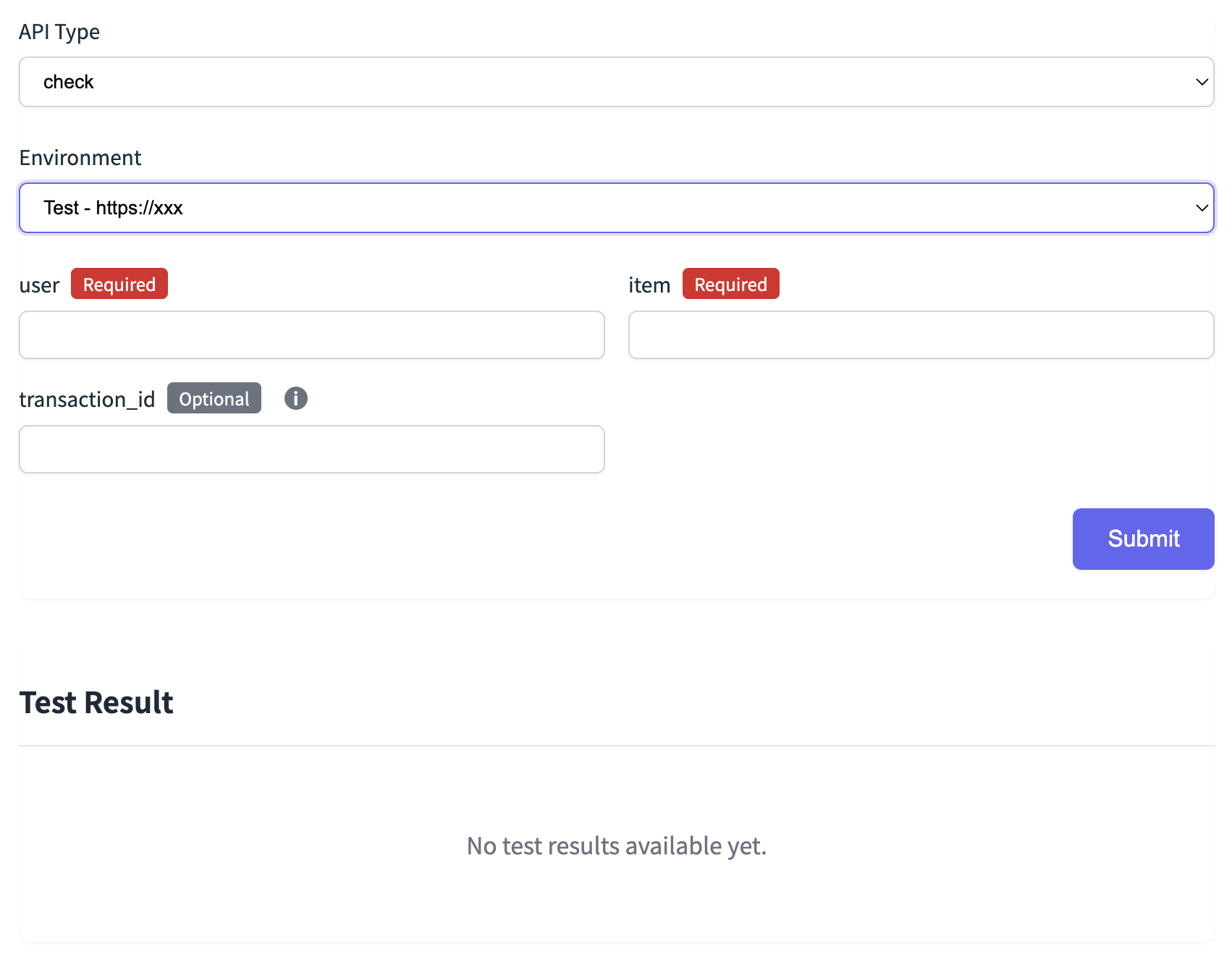
Yes, Game8 provides a test tool for verifying API connectivity.
From a web form like the one below, you can easily try out the various APIs (/check, /register , etc.).
- Enter the required fields (e.g.,
user,item) and submit to see the response - Optional fields (e.g.,
transaction_id) can also be specified - Test results are output in the "Test Result" section at the bottom of the screen
After the initial tests with the tool are complete, Game8 will also verify operation in the development and production environments.
Game8 will also run production-equivalent payment tests using a credit card. The amounts used in testing will be canceled through the credit card company at the end of the month.
Questions about Products
Can we increase the bonus amount for first purchases only, or sell special-deal products limited to four times a month or once a day?
A:
Yes, this is possible. Products can be designed as follows, for example.
- Purchasable only once per user.
- Increased contents on the first purchase only.
- Purchasable only once per user per in-game season
- Purchasable only three times per month per user
In these cases, "one user" and "first purchase" are determined using both the Game8 ID and the in-game ID.
For example, users logged in with the same Game8 ID are counted as the same user even if their in-game IDs differ, so purchase limits and first-purchase checks are shared.
Conversely, users with the same in-game ID are treated as the same user even if their Game8 IDs differ, and limits and checks are likewise shared.
Questions about Operations
What can I check in the Game8 Store admin console?
A:
The admin console (dashboard) will be provided after API connectivity has been verified.
This admin dashboard is the central tool for the publisher's project team to prepare for sales and manage operations.
For details on the admin console features, please see here.
Who handles user inquiries?
A:
Unless otherwise specified, user inquiries are handled entirely by Game8.
Game8's support team takes full responsibility for questions about purchases, errors, point usage, and so on.
Inquiries received by the game's own support desk can also be forwarded to Game8 as they are.
If you would like to handle first-line responses yourself, or handle certain inquiries in-house, we can accommodate such arrangements as well — please feel free to consult us.
Can payments and item grants be processed while the game is under maintenance?
A:
Payments can still be processed, but items cannot be delivered in the game (or buyers cannot confirm them even if they are), so while the game is under maintenance, Game8 Store recommends suspending purchases.
During maintenance, if you return "purchasable": "maintenance" from the Check API, Game8 Store will display a message and cancel the purchase.
Example Check response
{
  "request_id": "abc125",
  "timestamp": "2025-02-04T12:36:00Z",
  "result_code": "PUB6000",
  "message": "The service is currently under maintenance.",
  "purchasable": "maintenance",
  "age_category": "adult",
  "account_limit": null,
  "stock": null
}
To prevent maintenance from starting between Check and Register, it is safer to set "purchasable": "maintenance" starting a few minutes before the maintenance begins.
If Register fails, manual handling such as resending the request will be performed after the maintenance ends.
What happens if POST register fails for some reason?
A.
Depending on the type of error, an automatic retry or cancellation is performed, and the credit card payment is refunded as well.
For specific error codes (e.g., PUB4000 or PUB4001), the request is automatically retried according to the defined retry interval and retry count.
If no error code is returned, or if the returned error code has no defined retry policy, the order is canceled without retrying, and the credit card payment is refunded.
Questions about Marketing & Campaigns
Can free items (0 yen) be offered?
A:
Yes, you can set up items priced at 0 yen.
However, as with regular paid items, entering the in-game ID is required.
You can also set restrictions such as the following:
- Available only once per user
- Available only during a specific period
- Displayed and distributed only to specified in-game IDs
Free items can also be used for promotions or as a kind of login bonus, so please feel free to contact us.
Can items be sold at a discount? Can a discount period be specified?
A:
Yes, you can set a discounted price for each item.
You can also specify the discount period (start and end dates).
For example, the following settings are possible:
- Apply the discounted price only for a set period (e.g., from MM/DD hh:mm to MM/DD hh:mm)
- Enable the discount only on specific days of the week or at the end of the month
- Conditional discounts such as "first purchase only" or "once per user per month"
- Discounts using coupons
We can configure these flexibly based on your needs, so please contact us to discuss.