Home › Features
Gift Settings
📝 This is a reference translation. In case of any discrepancy, the Japanese version prevails.
This page explains how to configure gift purchases (presents to other players). The settings apply per game.
What you can do with this feature
- Turning the gift feature on and off
- Setting the conditions for the gift feature
- Setting the limits for the gift feature
Screen Field Descriptions
- Accept gift purchases

This tab lets you turn the gift feature on and off.
The default is off (Stopped). When turned off, the "Buy as a gift" option no longer appears on the store's purchase screen.
- Sender conditions
For the gift feature, you can set usage conditions for the player who sends the item (the sender).
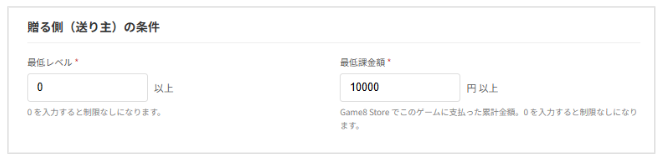
| Field | Description |
|---|---|
| Minimum level | Publisher API /user_info returns user_level and this value is used for the check.・To remove the restriction, enter:「0」 ※ user_level is -1 (a game with no concept of levels): setting this to 1 or higher will cause all gift purchases to fail, so please take care. |
| Minimum spending | Determined by the cumulative amount paid for the target game within Game8 Store. ・To remove the restriction, enter:「0」 *In-game (in-app) purchases and payments for other titles are not included. |
- Daily limits
Sets the maximum gift amount and number of gifts one user can send per day.
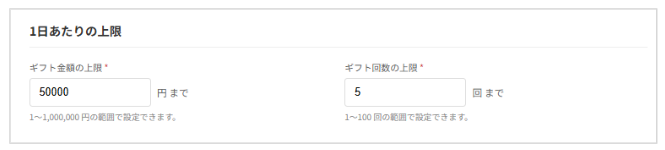
| Field | Description |
|---|---|
| Maximum gift amount | Sets the total maximum gift amount that can be sent per day. ・Range that can be set: 1 to 1,000,000 yen |
| Maximum gift count | Sets the total maximum number of gifts that can be sent per day. ・Range that can be set: 1 to 100 times |
* Notes
・Once either the amount or the count is reached, no further gift purchases can be made that day.
・The day resets at 0:00 JST, and limits are counted per sender.
- Platform-wide gift specifications (cannot be changed)
The following conditions are platform-wide specifications and cannot be changed on this screen.
・Recipient requirements: registration of a Game8 ID, email address, and in-game ID must be complete
・Payment method: credit card only